text to speech tutorials
How to Add Korean Text to Speech to Your Website
Whether you run a K-culture blog, an international e-commerce store, or an educational platform targeting a Korean-speaking audience, you should consider giving your visitors the option to listen to the content.
A well-installed Korean text to speech (TTS) play button allows your readers to hit the play button and hear your content read aloud in natural-sounding Korean.
And if you are thinking whether it is worth the effort, you should know that South Korea has one of the highest internet penetration rates in the world, and there are over 80 million people who speak Korean.
The good news? You don’t need to hire a voiceover artist or record anything manually. TTS tools like WebsiteVoice let you add a Korean play button to your site in minutes, with AI voices that sound natural and expressive.
In this guide, we’ll walk through how to set up Korean text to speech on your website.
Why Add Korean Text to Speech to Your Website?
Adding Korean TTS to your website is not just a nice-to-have feature. It solves real problems for real site visitors. Here’s why Korean TTS matters.
- Reach a Wider Audience: Over 80 million people speak Korean worldwide. So, if your website content is targeting Korean speakers, audio makes it accessible to more people.
- Improve Accessibility: People with visual impairments, reading disabilities like dyslexia, or common conditions like eye strain benefit from having an audio option. Korean TTS also makes your site more inclusive and can help with ADA compliance requirements.
- Boost Engagement and Time on Site: Visitors who listen to content tend to stay longer. So, a Korean TTS widget can be useful to retain website visitors.
- Support Multitaskers: There are many people who prefer to listen to the content while commuting, cooking, or working out. Korean text to speech play button will turn your website content and articles into audio articles that readers can consume hands-free.
Related: Why Adding Text-to-Speech Is Important

Meet the WebsiteVoice’s Korean AI Voices: Chaewon and Eun Jung
When adding Korean TTS to your website, the quality of the voice is as important as the feature itself. A robotic, unnatural voice is going to drive visitors away from your site instead of keep them engaged.
This is why WebsiteVoice offers two different Korean AI voices:
1. Korean (Chaewon)
It is a clear, friendly female voice with natural intonation. Chaewon can handle conversational content well, which makes it a strong choice for blogs, news articles, and general website content.
The pacing feels natural, and the pronunciation of Korean characters (Hangul) is accurate and smooth.
2. Korean (Eun Jung)
This Korean AI voice brings a slightly different tone and cadence to give you variety depending on your content style and audience preferences. Having two voice options means you can test which one resonates better with your visitors.
Both voices are part of WebsiteVoice’s library of 60+ AI voices across 35+ languages. These voices are built using modern AI speech synthesis that produces human-like results and not the choppy, robotic output that you might get in other TTS tools.
Also Read: AI TTS Evolution: Crafting Human-Like Voices
How to Add Korean TTS to Your Website (Step by Step)
Setting up text to speech play button on your Korean website with WebsiteVoice takes just a few minutes. Follow these steps:
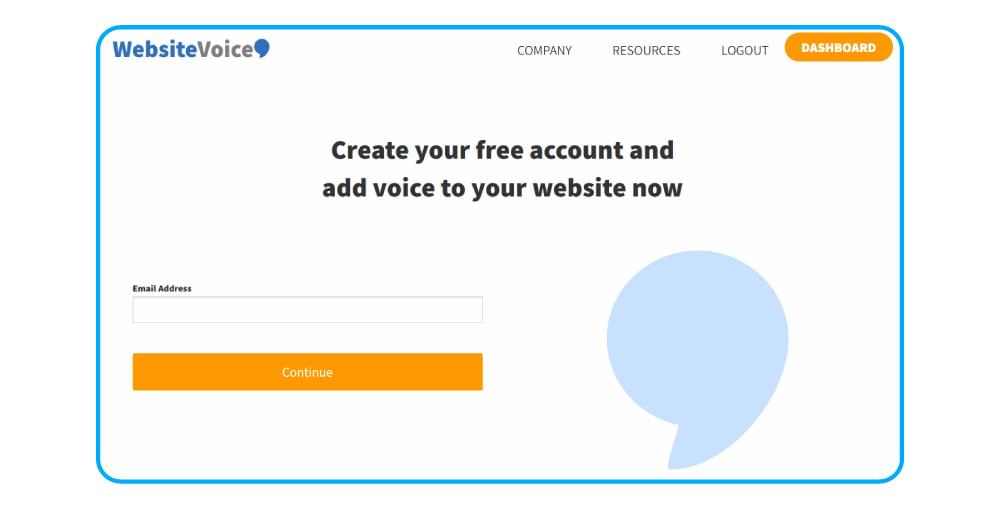
Step 1: Sign Up for a Free Trial
Open WebsiteVoice and create an account. The 14-day free trial doesn’t require a credit card, so you can test everything before committing to a paid plan.
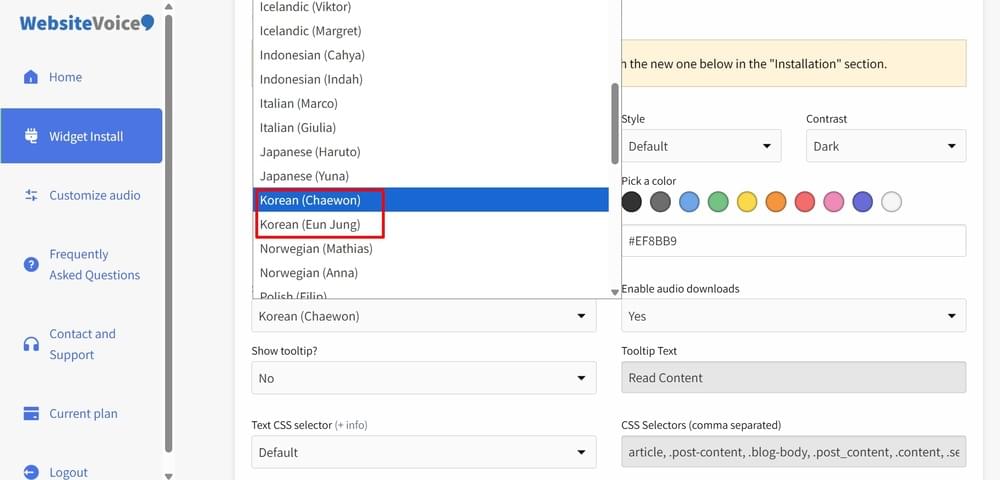
Step 2: Select Korean as Your Language
In your widget settings, you’ll be able to select between the Chaewon and Eun Jung voices. Preview both to decide which Korean AI voice fits your content best.
Step 3: Customize the Audio Player
Adjust the play button’s appearance to match your site’s design. You can change colors, position, and style so the widget looks like a natural part of your website and overall brand. WebsiteVoice also lets you add custom intro and outro text if you want to brand the audio experience.
Step 4: Add Your Website
Add your website URL under the Update Website section. It will allow WebsiteVoice to connect with your website and add the TTS widget.
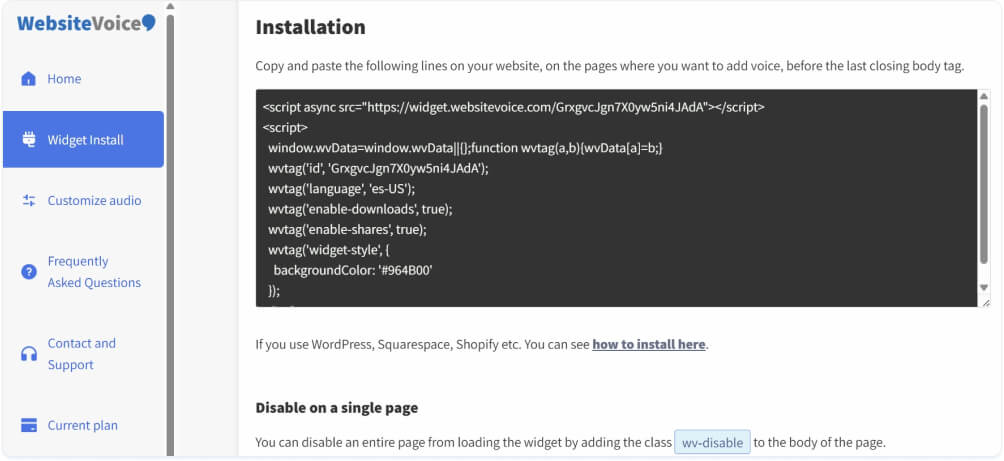
Step 5: Install the Widget on Your Website
Copy the JavaScript snippet from your dashboard and paste it into your website’s HTML. The exact placement depends on your platform, but it generally goes before the <body> tag in the footer section of your site’s code.
Step 6: Test and Go Live
Visit your site, and you should see the play button appear on your content pages. Click it, listen to the Korean audio, and make sure everything sounds right. Adjust speed settings using the Universal Voice Tailor if needed.
Related: Getting Started with WebsiteVoice
Tips to Add Korean Text to Speech in Different CMS Platforms
The general process and steps discussed above work for any website, but here are some quick tips depending on your platform.
WordPress
The easiest option is the WebsiteVoice WordPress plugin. Install it directly from your WordPress dashboard, activate it, and configure your Korean voice settings without touching any code.
Complete Guide: How to Add Text to Speech to WordPress with a Plugin?
Shopify
Add the JavaScript widget through your Shopify theme’s code editor. Go to Online Store > Themes > Edit Code and paste the snippet in your theme.liquid file. This works well for Korean-language product descriptions and blog content.
Complete Guide: How to Add Text to Speech Play Button Shopify?
Wix
Use Wix’s custom code feature to add the WebsiteVoice snippet. You’ll find this under Settings > Custom Code in your Wix dashboard. Paste the copied code and Korean TTS play button should appear on your Wix website.
Complete Guide: How to Add Text to Speech to Wix?
Squarespace
Add the code through Settings > Advanced > Code Injection. Paste the snippet in the header/footer section, and your Korean TTS play button will appear across your Squarespace pages.
Complete Guide: How to Add Text to Speech to Squarespace?
Webflow
Webflow lets you add custom code at the project level or on individual pages. This makes it easy to add Korean TTS to specific sections of your site or across the entire domain.
Complete Guide: How to Add Text to Speech to Webflow?
Custom or Other Platforms
If you’re building with custom HTML, a headless CMS, or another platform, you can integrate the widget using the JavaScript TTS API approach. As long as you can add a script tag to your site in the correct theme’s settings, WebsiteVoice will work.
Complete Guide: How to Add JavaScript Text-to-Speech API to Your Website?
Best Practices for Korean Text to Speech
Here are some tips and strategies that can help you get the maximum benefits from the Korean text to speech:
1. Clean and Structured Content: TTS engines are trained to read what’s on the page. So, your Korean content should be properly formatted and structured to get the most natural audio.
2. Use Shorter Paragraphs: Similar to the English content, shorter paragraphs in Korean also tend to perform well in text to speech technology. It improves content readability in both reading and listening.
3. Authenticate Voice: AI Voices like Chaewon and Eun Jung are highly accurate. Nevertheless, it is recommended that you try out these Korean TTS voices with native speakers to make the best choice.
4. Consider Your Audience’s Preferences: Always consider your audience’s requirements while setting up Korean TTS. It will help you in including additional features like social sharing buttons and speed control in WebsiteVoice’s play button.
Who Benefits From Korean TTS on Websites?
The Korean text-to-speech play button is beneficial for different types of websites and audiences, including:
- Students learning Korean can listen to properly pronounced text as they read the Korean content along. This is especially useful for educational institutions and e-learning sites.
- Blogs covering K-pop, K-drama, Korean food, or travel in Korea typically target audiences worldwide. A TTS play button adds a professional, accessible touch that sets you apart.
- E-commerce stories can also add Korean TTS widgets to make it easier for users to listen and understand the product descriptions, FAQs, and blog content.
- Any other organization or website that wants to prioritize accessibility and inclusion should install the Korean text to speech widget
Also Read: Text-to-Speech Benefits for Different Industries
Conclusion
Adding the Korean text to speech play button to your websites can be a true game changer and boost your site’s traffic, engagement, and accessibility to a great extent. If you want to enjoy all these benefits, sign-up for WebsiteVoice for free and see how it can take your Korean website or blog to the next level!
FAQs
Does Korean TTS Work With Hangul and Mixed Korean-English Text?
Absolutely. WebsiteVoice handles Hangul text natively, and mixed-language content is supported as well. So, if your Korean content includes English words, brand names, or technical terms, the AI voice will handle the transitions naturally.
Is It Difficult to Set Up Korean TTS if I’m Not Technical?
Not at all. You can easily set up a Korean text to speech play button on any website and CMS platform. If you’re on WordPress, you can use the plugin and have Korean TTS running in under five minutes. Similarly, for other platforms, you just have to copy-paste the JavaScript snippet. Ultimately, WebsiteVoice is designed to be easy for anyone to use, regardless of technical background.
Can Visitors Download the Korean Audio as an MP3?
Yes. WebsiteVoice includes an MP3 download option. You can configure this option on the dashboard and choose the enable audio download option to ensure users get the option to download Korean audio from your site.
How Natural Do the Korean AI Voices Sound?
The Chaewon and Eun Jung voices in WebsiteVoice use modern AI speech synthesis. It produces realistic results that are closer to human speech than older TTS technology. The overall pronunciation, rhythm, and intonation are designed to sound natural and easy to listen to.