text to speech tutorials
How to Add Spanish Text-to-Speech Play Button To Websites?
If you are exploring Spanish text to speech solutions, you are on the right path! The fact that Spanish is the fourth most spoken language in the world with over 600 million speakers worldwide means you should definitely add a Spanish TTS play button to your websites to make the content accessible, engaging, and inclusive to Spanish speakers all around the world.
Audio playback possible with a Spanish TTS play button will help the visitors consume your content while multitasking. It is also perfect to target the massive traffic coming from mobile device users.
WebsiteVoice makes this process quick and simple with 5 distinct Spanish AI voices, covering varying accents. The best part is that you can try it free for 14 days without providing any credit card details.
In this article, we’ll explore how you can select the right Spanish voice for your audience and install the Spanish TTS play button on your website.
Note: This guide covers adding Spanish text to speech to general custom websites. If you’re using a CMS platform, check out our step-by-step guides for WordPress, Shopify, Wix, Squarespace, Blogger, Joomla, Webflow, Drupal, and Ghost.
What is Spanish Text to Speech?
Spanish text to speech technology converts written Spanish content into spoken audio. It uses artificial intelligence (AI) algorithms to analyze the content and turn it into speech. This process is possible because modern TTS systems analyze the text structure and use the right pronunciation rules to generate natural-sounding speech that listeners recognize as authentic.
A Spanish text to speech widget is an ideal solutions for websites that serve Spanish-speaking audiences in Spain, Latin America, the United States, or anywhere in the world.
Many different types of Spanish TTS solutions are available in the market, but not every platform takes into account the unique characteristics of the Spanish language.
The language has significant pronunciation differences between regional varieties. For example, a speaker from Madrid uses distinct sounds compared to someone from Buenos Aires. Even though the words are spelled identically, they can sound quite different depending on the accent.
These variations matter to your audience. This is why quality Spanish text to speech tools like WebsiteVoice offer support for different accents and dialects through multiple AI Spanish voices.
Why Add Spanish Text-to-Speech to Your Website?
Here are some reasons why you should consider adding Spanish text to speech to your websites:
- Reach 600+ Million Spanish Speakers: Spanish is spoken across 20+ countries as an official language. So, a Spanish TTS widget can help you connect with a massive audience.
- Improve Mobile User Experience: Mobile internet usage is extremely high in Spanish-speaking markets. Many mobile users browse websites while doing other activities, so audio content fits naturally into their habits.
- Boost Accessibility: Adding a text to speech play button in Spanish can make your content accessible to visitors with visual impairments and reading difficulties. It is an important part of creating an inclusive web experience.
- Educate Learners: Educational Spanish websites can benefit from the text to speech technology by helping students learn the language with its proper pronunciation while reading.
WebsiteVoice Spanish Voices
WebsiteVoice has 5 different natural-sounding Spanish AI voices. It gives you the flexibility to match your audience’s expectations.
The following are Spanish text-to-speech voices you can choose in WebsiteVoice:
- Spanish, Spain (Josep): Male voice with a Castilian Spanish accent. It is ideal for websites that have their target audiences in Spain and provide European business content or formal publications where the peninsular Spanish sound is common.
- Spanish, Spain (Daniela): Female voice with a clear Castilian pronunciation. It works well for educational content, lifestyle blogs, and brands that serve Spanish audiences who prefer the European Spanish accent.
- Spanish, Mexican (Adriana): Female voice with a Mexican Spanish accent. It is best suited for websites that have their target audience in Mexico, Central America, and the US Hispanic communities.
- Spanish, US (Airam): Male voice designed for US Spanish speakers. Businesses that target the US Hispanic market and have bilingual content should use this option.
- Spanish, US (Valentina): Female voice with US Spanish pronunciation. This Spanish text to speech works well for consumer brands, media companies, and websites that are focused on Spanish-speaking audiences in the United States.
Choosing the right Spanish TTS AI voice is important to maximize your engagement. A visitor from Spain is likely to notice if your website uses a Latin American accent, and vice versa. So, matching the voice to your primary audience’s regional dialect helps create a more authentic experience that signals you understand and respect their linguistic preferences.
How to Set Up Spanish Text-to-Speech on Your Website
The entire process of setting up Spanish text to speech on your website can be completed within 5-10 minutes by following these 4 steps:
Step 1: Create an Account on WebsiteVoice
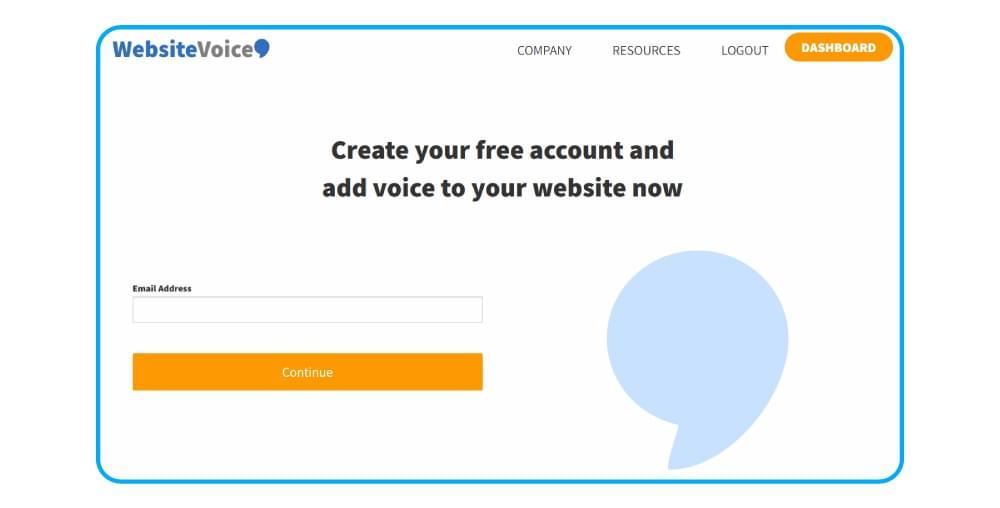
Go to WebsiteVoice and sign up for a free account. You can use the 14-day trial to try out all features, including all 5 Spanish voices, widget customization options, analytics, and MP3 download capability. No credit card is required to start the trial.
Step 2: Select Your Spanish Voice and Customize the Widget
Log in to your account to access the WebsiteVoice dashboard. Open the voice selection section to see Spanish (Josep), Spanish (Daniela), Spanish (Adriana), Spanish (Airam), and Spanish (Valentina) among the 60+ available voices.
You can preview how your selected voices sound by clicking on the play button. Choose the voice that best matches your target audience’s regional variety and your website’s tone.
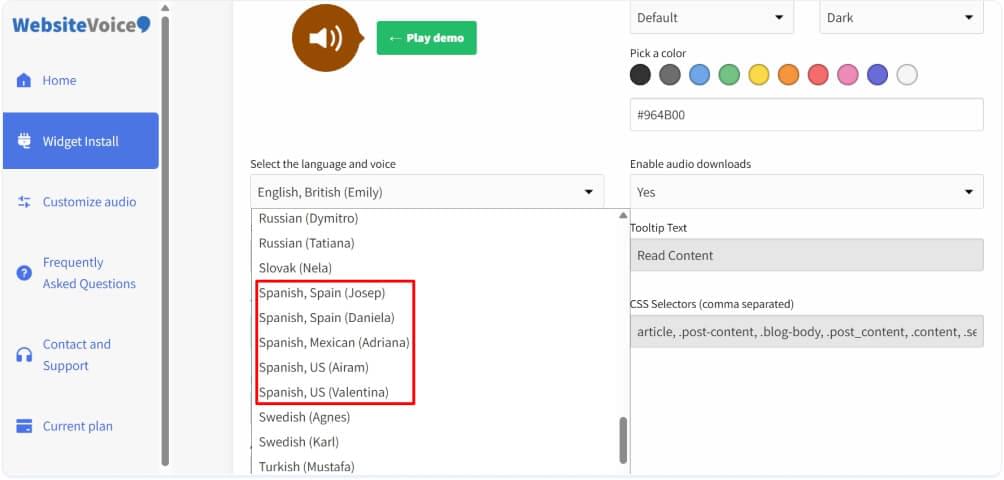
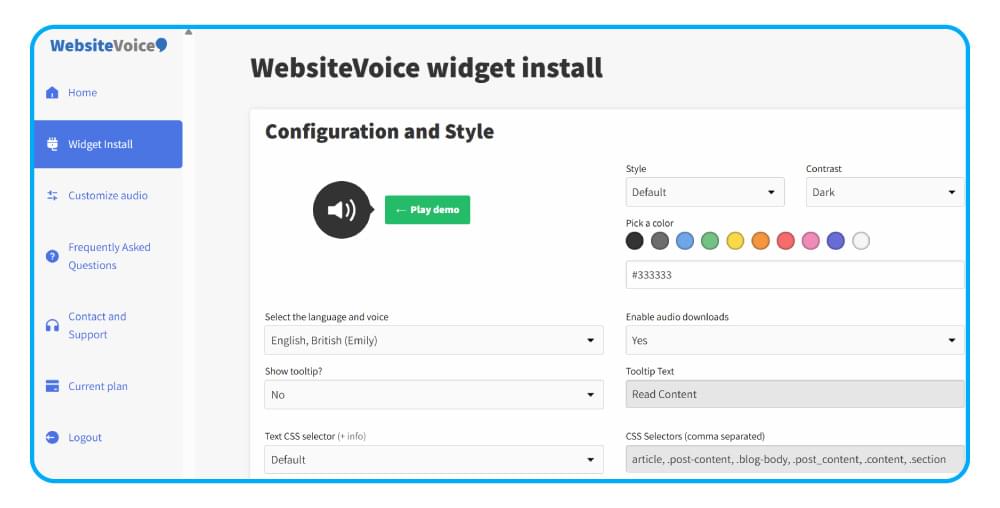
After selecting your Spanish AI voice, customize the WebsiteVoice audio player widget’s appearance. You can easily adjust the player color to match your brand palette (enter a specific hex code or use the color picker).
Moreover, you can choose a player style (default, slim, or button format), set the contrast for light or dark backgrounds, and decide whether to enable audio downloads and social sharing buttons.
Step 3: Install the Code
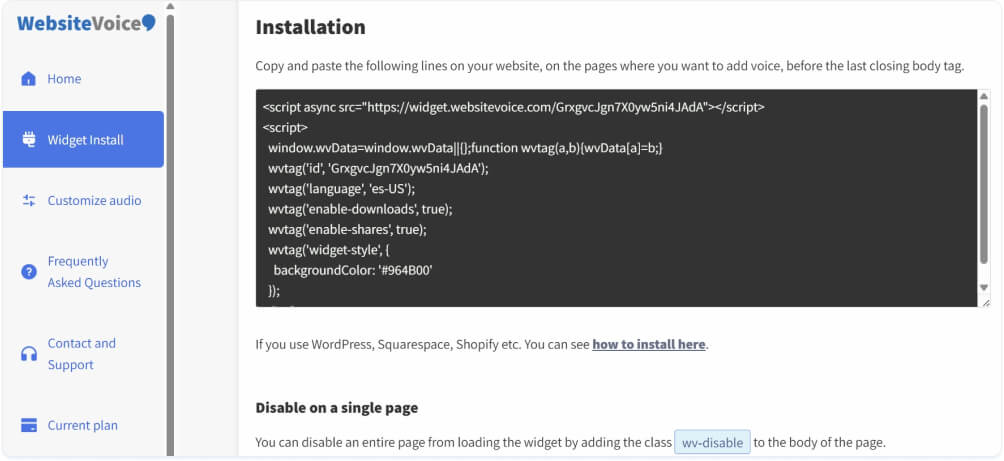
Copy the JavaScript code snippet from the Installation section. This code needs to be pasted into your website’s HTML files, specifically right before the closing </body> tag in footer files.
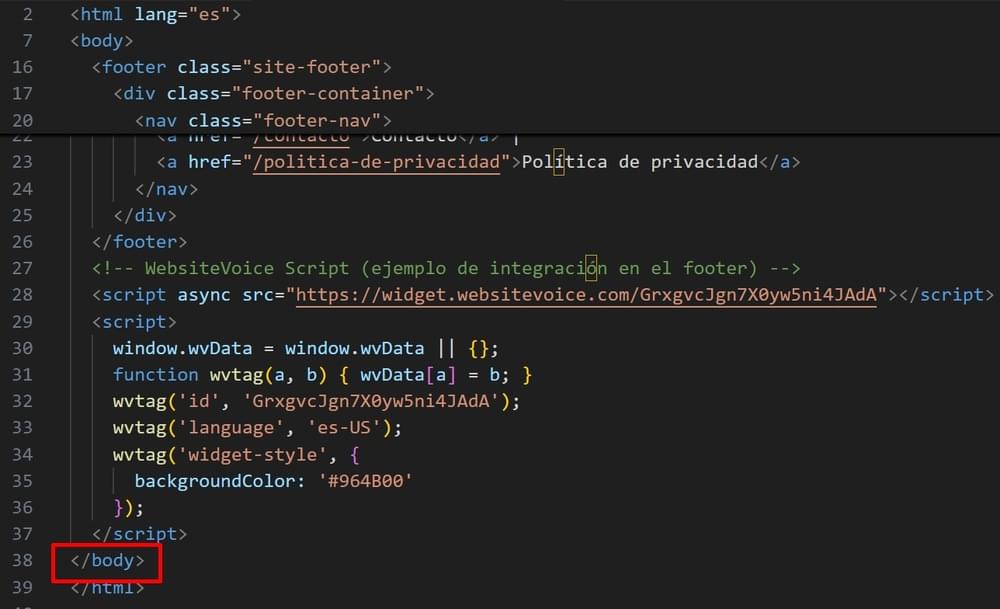
If you have raw HTML files, open your footer template or main HTML file in a code editor, find the </body> tag near the end, and paste the WebsiteVoice code immediately before it.
If you need guidance on where to paste the code for your specific setup, the JavaScript TTS API guide provides more details, or you can also contact us for more information.
Step 4: Authorize Your Website
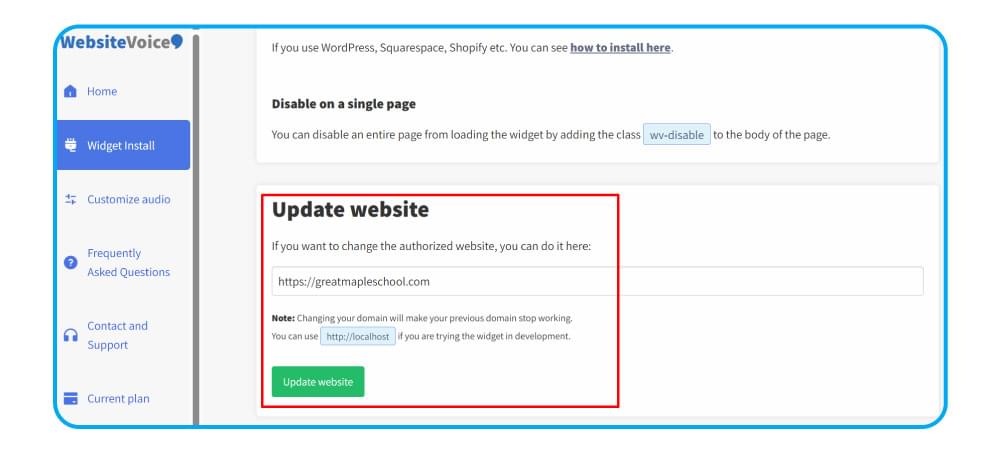
Return to your WebsiteVoice dashboard and enter your website’s domain name under the Update website section to authorize the TTS widget. This security step ensures the TTS play button only appears on an authorized domain.
Open your Spanish website and confirm that the play button appears on your content pages. Click it to verify the audio plays correctly with your selected Spanish voice.
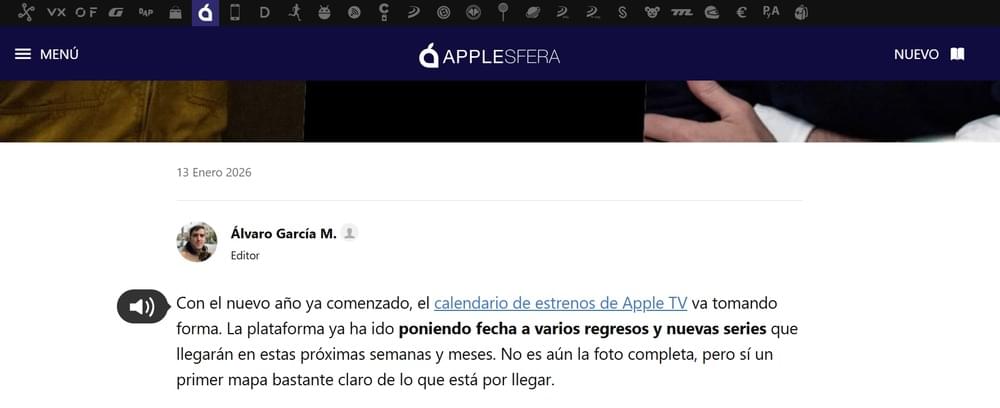
These quick and simple steps will implement the text to speech technology in your Spanish website and help you reach a wider audience.
Conclusion
The bottom line is that adding a Spanish text to speech play button to your website opens your content to over 600 million Spanish speakers worldwide. WebsiteVoice make this process quicker and simpler as you get to choose from 5 different Spanish voices covering Spain, Mexico, and US accents to match your specific audience.
The installation process takes minutes, and you can preview each voice before committing. Moreover, the 14-day free trial lets you test the full platform, including all Spanish voices and customization options, without any long-term commitment.
Start your free trial with WebsiteVoice and see how the Spanish text-to-speech play button can improve your website’s accessibility and engagement.
FAQs
How Many Spanish Voices Does WebsiteVoice Offer?
WebsiteVoice offers 5 natural-sounding Spanish AI voices. These are Josep (Spain, male), Daniela (Spain, female), Adriana (Mexican, female), Airam (US, male), and Valentina (US, female).
Can I Add Spanish Text-to-Speech to My WordPress Website?
Yes. WebsiteVoice works with all major website platforms, including WordPress, Shopify, Wix, Squarespace, and custom HTML sites. WordPress users can easily install the Spanish text to speech play button widget through theme file customization or using the dedicated plugin.
Can I Switch Between Spain (Spanish) and Latin American (Spanish) Voices?
You select one voice for your website during setup. But if you want to change the voice later, you can do so in your WebsiteVoice dashboard at any time and use the updated code to change the TTS voice on your website.
Can I Customize How the Spanish Audio Player Looks?
Yes. You can customize the audio player’s color and style to match your website’s design. The customization options are available in your WebsiteVoice dashboard before you install the code.
Can I Track How Many Visitors Listen to My Spanish Content?
Yes. WebsiteVoice offers built-in real-time analytics that show you how long visitors are listening to your content. This helps you understand which articles, blog posts, or website pages are resonating the most with your Spanish-speaking audience in audio format.
Does WebsiteVoice Handle Spanish Accent Marks and Special Characters?
Yes. WebsiteVoice’s Spanish AI voices correctly interpret accent marks (tildes), the letter “ñ”, inverted punctuation marks (¿ and ¡), and other Spanish-specific characters. This ensures proper pronunciation and natural-sounding speech, no matter how complex your content is.