text to speech tutorials
How to Add Arabic Text-to-Speech Play Button to Your Website?
More than 400 million people worldwide speak Arabic, making it the fifth most spoken language globally. So websites owners who target Arabic-speaking audiences across the Middle East, North Africa, and beyond, should focus on creating an accessible and engaging user experience.
Adding a text-to-speech play button to your Arabic website can be a vital step in this regard as it transforms the way visitors interact with your content.
Websites with traditional text-only content can struggle to hold the attention of readers. This is where Arabic text-to-speech technology becomes useful. WebsiteVoice is a powerful solution to help you. It has 2 2 natural-sounding Arabic AI voices, one male and one female, that can you embed to your website and let visitors listen to your content.

Let’s see how exactly can you add Arabic text-to-speech play button to your website.
What Is Arabic Text-to-Speech?
Arabic text-to-speech (TTS) is a technology that converts written Arabic text into spoken audio using artificial intelligence. Modern Arabic TTS systems can handle the complexity of Arabic script, including diacritical marks (tashkeel) to ensure proper pronunciation of words that can vary based on regional dialects.
if you are used to publishing Arabic content online, you are likely familiar with the challenges like right-to-left text layout, complex script rendering, and audiences increasingly consuming content on mobile devices while multitasking.
This is why quality Arabic TTS systems like WebsiteVoice are specifically designed to handle these challenges and produce natural-sounding speech that Arabic speakers recognize as authentic and accurate.
Why Add Arabic Text-to-Speech to Your Website?
Here are some key benefits of adding Arabic TTS to your websites:
- Higher Accessibility for Arabic-Speaking Visitors: Create an inclusive web experience for visitors with visual impairments, reading difficulties, or learning disabilities.
- Improve Engagement for Mobile Users: The MENA region has 350 million+ mobile internet users. Since most mobile users multitask, you can engage them better with audio content.
- Better User Experience: Reading lengthy blog posts, news articles, or educational content can be tiring for many users. Audio playbacks are a great alternative to reduce eye strain and provide a better user experience.
- Pronunciation Learning: Educational websites focused on teaching Arabic also find TTS to be a great technology as students can hear how different words and sentences sound.
WebsiteVoice Arabic Voices
WebsiteVoice has 2 natural-sounding Arabic AI voices. It gives you options to match your brand tone and audience preferences. These are the two different Arabic text-to-speech voices available in Arabic:
1. Arabic (Yousef): Male voice with clear and authoritative pronunciation. It is ideal for news websites, business content, and professional blogs.
2. Arabic (Aziza): Female voice with a warm and engaging tone. It works well for educational content, lifestyle blogs, health and wellness websites, and platforms targeting diverse Arabic-speaking audiences.
Both of these realistic and AI Arabic voices are trained on Modern Standard Arabic (MSA). It is the formal variety used in media, education, and official communications across the Arab world. This is useful to ensure your content is understandable to Arabic speakers anywhere in the world regardless of their regional dialect, whether they’re from Egypt, Saudi Arabia, Morocco, Iraq, or anywhere else in the Arabic-speaking world.
How to Set Up Arabic Text-to-Speech on Your Website?
Let’s see how exactly you can install the Arabic text-to-speech play button on your website:
Step 1: Create an Account on WebsiteVoice
Open the WebsiteVoice website and sign up for a free account.
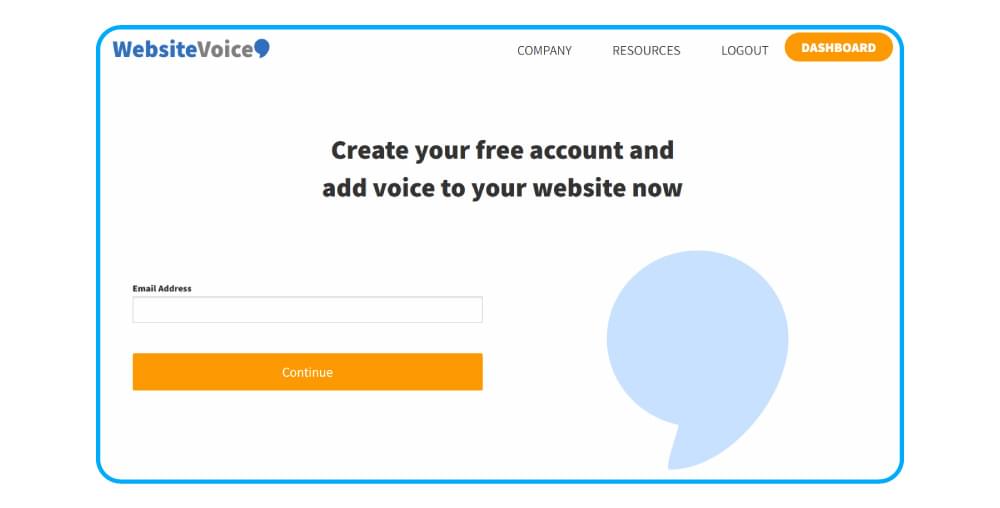
You can start with a 14-day trial to try out all the features, including both Arabic voices, widget customization, social sharing buttons, and analytics.
Step 2: Select the Arabic Voice
Open the voice selection section on the dashboard. You’ll see Arabic (Yousef) and Arabic (Aziza) among the 60+ available voices in the selection menu. Here you can choose the voice that suits your website’s tone and audience. You can also preview and listen to each voice by clicking on the Play demo button.
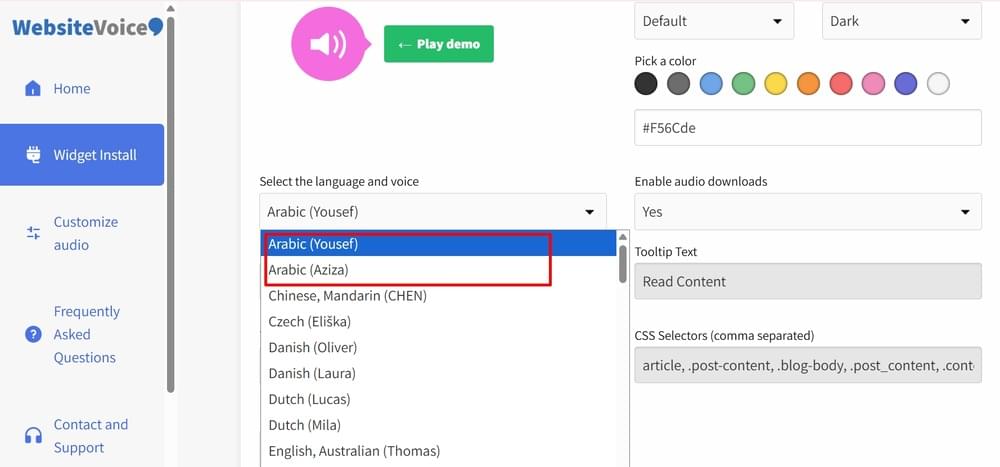
Step 3: Customize the Arabic TTS Play Button Widget
Once you have selected the Arabic voice, you can customize the audio player appearance to match your website design. Some of the key customization options are:
- Player color to match your brand colors. Pick a color or enter the hex code of your desired color.
- Player style (default, slim, or button)
- Player contrast (light or dark)
- Enable audio downloads (yes or no)
- Enable social share icons (yes or no)
Overall, the configuration of your TTS play button is quite easy, so you can easily set the widget’s appearance as per your requirements before installation.
Step 4: Copy and Paste the Code
WebsiteVoice provides a simple JavaScript code that you have to copy and paste to your website to install the Arabic text-to-speech widget.
All you need to do is copy the code from your WebsiteVoice’s dashboard:
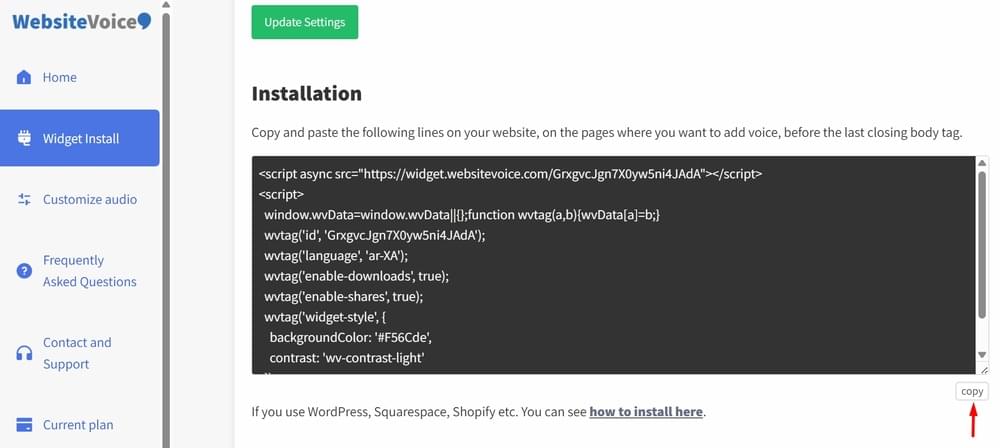
Paste the copied code into the footer HTML files of your website or through your CMS theme editor right before the closing </body> tag.
WebsiteVoice works with all major platforms. If you’re using WordPress, Shopify, Wix, Squarespace, Blogger, Joomla, Webflow, Drupal, or Ghost, you can follow our platform-specific installation guides to see where you have to paste the TTS script.
Save your changes and make sure the web server can access the updated code files for the TTS play button to appear on your Arabic website.
Step 5: Authorize Your Website
On your WebsiteVoice dashboard, navigate to the Update Website section. Add your website’s domain name to authorize the widget to appear on your site. This is an important security step to ensure WebsiteVoice’s Arabic TTS play button can integrate with your website after proper authorization.
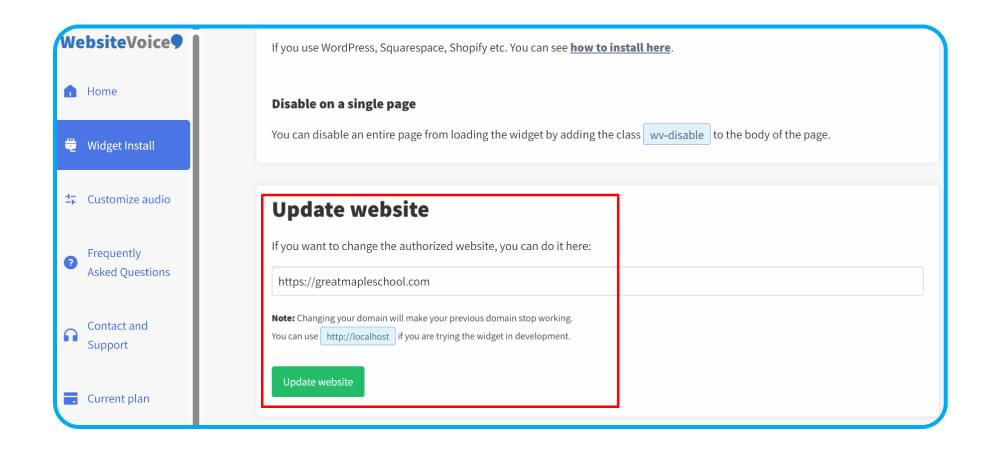
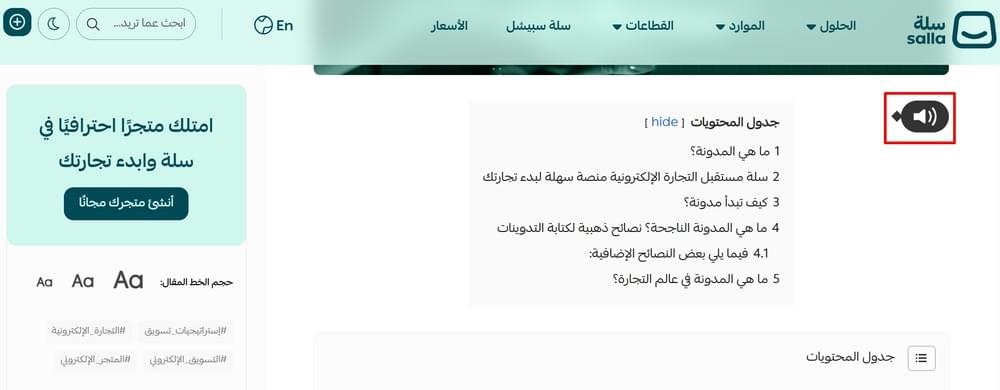
Now, open your Arabic website and confirm that the play button is appearing and working correctly.
Conclusion
Overall, adding an Arabic text-to-speech play button to your website is an effective and reliable way of improving accessibility, engagement, and user experience. It can make the content consumption process smoother for 400+ million Arabic speakers.
The best part is that you can start with a 14-day free trial and try out both male and female Arabic TTS voices available in WebsiteVoice. It means you can try out the platform and play button’s appearance before making any long-term commitment.
Frequently Asked Questions
How Many Arabic Voices Does WebsiteVoice Offer?
WebsiteVoice offers 2 natural-sounding Arabic AI voices: Yousef (male) and Aziza (female). Both of these voices use Modern Standard Arabic pronunciation to ensure they are understandable across all Arabic-speaking regions. You can preview each voice in your dashboard before selecting one for your website.
Can I Add Arabic Text-to-Speech to My WordPress Website?
Yes! WebsiteVoice works with all major website platforms, including WordPress, Shopify, Wix, Squarespace, and custom HTML sites. WordPress users can use the dedicated plugin for simpler and quicker integration.
Can I Customize How the Arabic Audio Player Looks?
Absolutely. You can customize the Arabic play button / audio player’s color, style, and appearance to match your website’s design. The customization options are available in the WebsiteVoice dashboard, so you can easily modify them before code installation.
Can I Track How Many Visitors Listen to My Arabic Content?
Yes. WebsiteVoice includes built-in real-time analytics to show content creators and website owners how long visitors are listening to their content. This data helps you understand how your Arabic-speaking audience is benefiting from the text-to-speech widget.