
text to speech tutorials
How to Add Japanese Text-to-Speech Play Button to Websites?
Japanese is one of the most used languages on the internet, with over 120+ million speakers around the world. So, if you are running a website serving the Japanese-speaking audience, you should consider adding a Japanese text to speech play button to your website to engage the visitors.
By allowing your audience to listen to your content instead of reading it, you can get higher engagement, traffic, and greater user retention.
In this article, we’ll explore how you can easily add Japanese text to speech to your website within minutes using WebsiteVoice.
What Is Japanese Text-to-Speech?
Japanese text to speech is a technology that converts written Japanese text into spoken audio using AI-generated voices. Traditional Japanese TTS voices used to sound mechanical and robotic.
However, the TTS technology has evolved to provide you with more natural and conversational Japanese speech.
Challenges
Converting Japanese text to speech presents unique challenges for TTS systems because the language uses three distinct writing systems: kanji (logographic characters), hiragana, and katakana (both syllabic scripts).
Moreover, Japanese relies on a pitch accent system where the pitch of a word can change its meaning entirely. Therefore, quality Japanese TTS systems like WebsiteVoice handle these nuances while maintaining natural rhythm and intonation. WebsiteVoice has two different natural-sounding Japanese AI voices that you can add to your website in just a few minutes.
Why Add Japanese TTS to Your Website?
Adding a Japanese text to speech play button can open doors to an entirely new audience segment. It allows visitors to consume your content while commuting, exercising, or multitasking throughout their day.
Moreover, people with visual impairments can access your website content and blog posts much more easily. And if you are catering to Japanese language learners, hearing proper pronunciation makes your site significantly more valuable as an educational resource.
Here’s why you should definitely consider adding Japanese TTS to your websites:
- Higher Accessibility: Adding Japanese audio playback makes your content accessible to visitors with visual impairments, dyslexia, or other reading difficulties.
- Supports Mobile-First Users: Audio allows Japanese mobile users to consume your articles or blog posts while on the go, fitting seamlessly into their busy lifestyles.
- Supports Japanese Language Learners: If you publish educational content on your site, you should definitely add the TTS widget to help language learners hear the correct pronunciation of kanji characters and understand proper pitch patterns.
- Boost Engagement: Visitors who listen to content are likely to stay on your website longer since they don’t have to read through large blocks of text. This helps boost engagement metrics and reduce bounce rate.
WebsiteVoice Japanese Text to Speech AI Voices
WebsiteVoice offers 2 natural-sounding Japanese AI voices so you can easily pick the voice that suits your brand’s tone and audience’s preferences. The Japanese TTS voices are:
- Japanese (Haruto): Male voice with a clear and standard Japanese accent. It is perfect for news websites, business content, and formal articles that require a professional tone.
- Japanese (Yuna): Female voice with a warm and approachable tone. This voice works well for lifestyle blogs, educational content, e-commerce product descriptions, and websites targeting a broader consumer audience.
Both of these Japanese TTS voices handle all three Japanese scripts accurately, so they can easily pronounce Japanese words with proper pitch accent and natural enunciation. The best part is that you can preview each voice in your WebsiteVoice dashboard before installing it on your website.
How to Install the Japanese Text to Speech Play Button on Your Website?
Follow these steps to add a Japanese TTS play button to your website with WebsiteVoice.
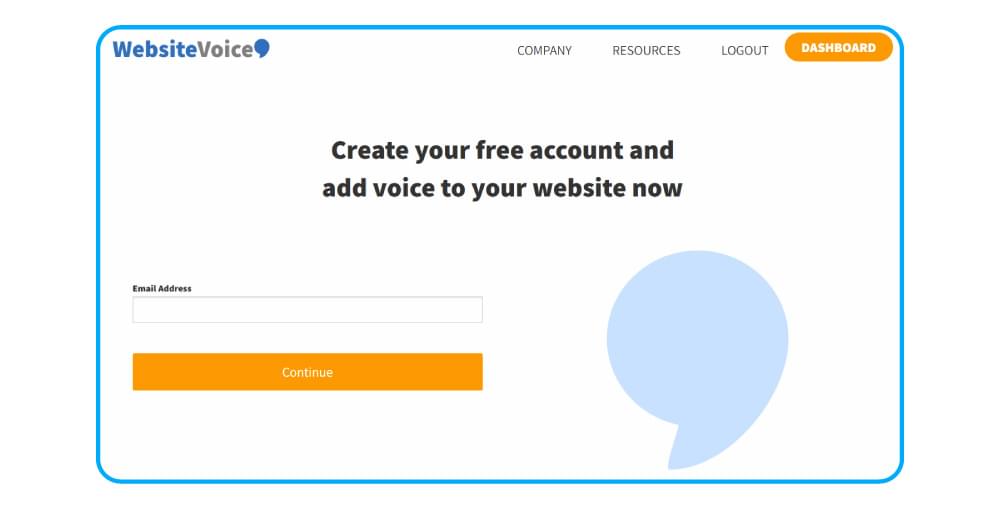
Step 1: Create an Account on WebsiteVoice
Open the WebsiteVoice site and create your account. You can begin with a 14-day free trial to test all features.
Step 2: Select Your Japanese Voice and Customize the Widget
In your WebsiteVoice dashboard, open the voice selection settings. You can choose between Haruto and Yuna Japanese voices as per your requirements. You can also listen to the sample audio for each voice to ensure it fits your brand’s personality.
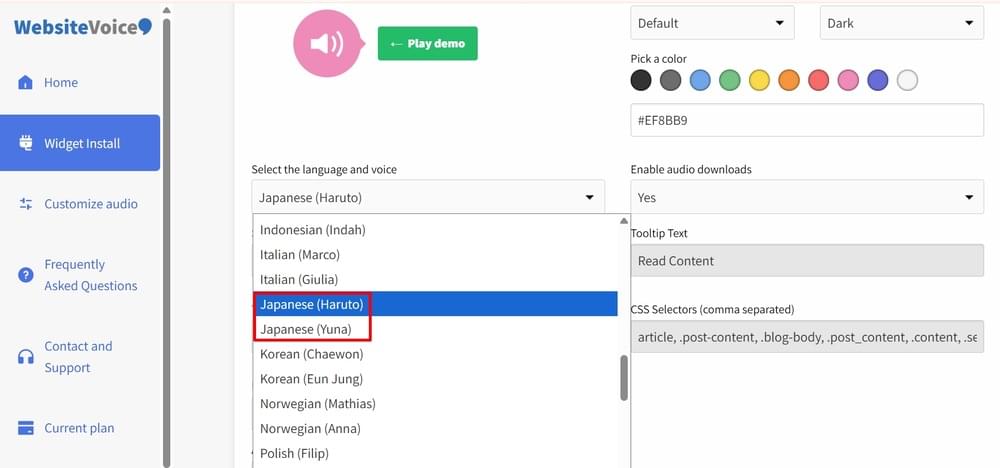
Other than voice selection, you can also customize the text to speech audio player’s appearance. These customization features are useful to match the widget’s color to your website’s design.
Step 3: Install the Code
After configuring the Japanese TTS widget settings, go to the Installation section in your dashboard. You’ll find a code snippet that you need to copy and paste into your website’s HTML, just before the closing </body> tag.
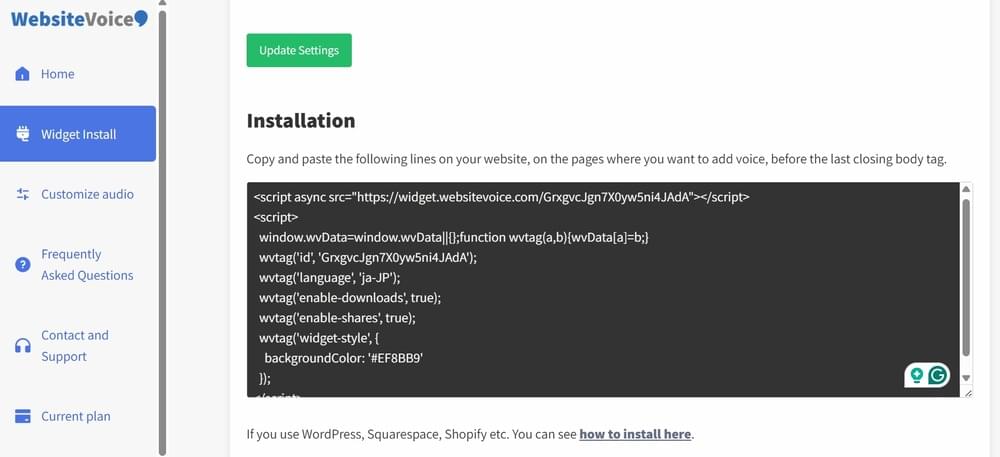
If you are not sure where to find this, open your website’s main HTML file and scroll to the bottom. The </body> tag appears near the end, right before </html>. You can also contact us to get help.
Note: If you’re using a CMS platform, you can check out our step-by-step guides for WordPress, Shopify, Wix, Squarespace, Blogger, Joomla, Webflow, Drupal, and Ghost.
Step 4: Authorize Your Website
Go back to your WebsiteVoice dashboard and enter your domain under the Update Website section. This will authorize the WebsiteVoice text-to-speech widget to work on your site.
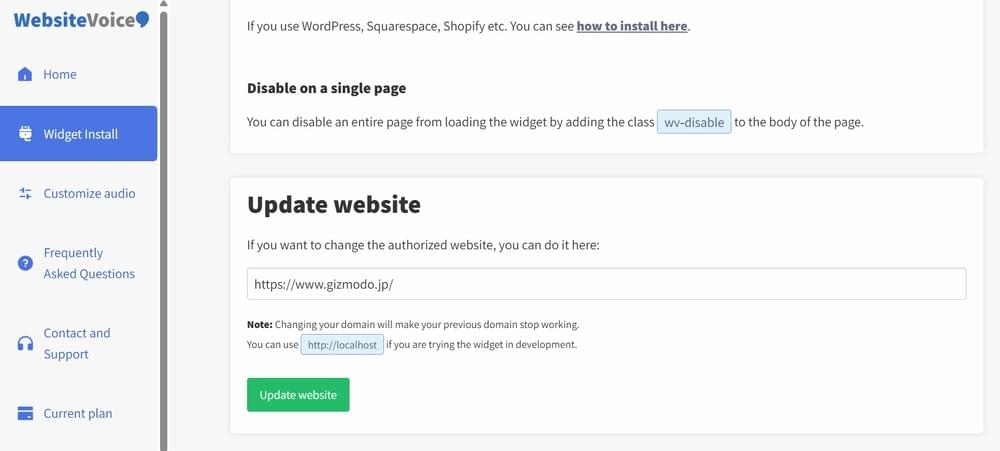
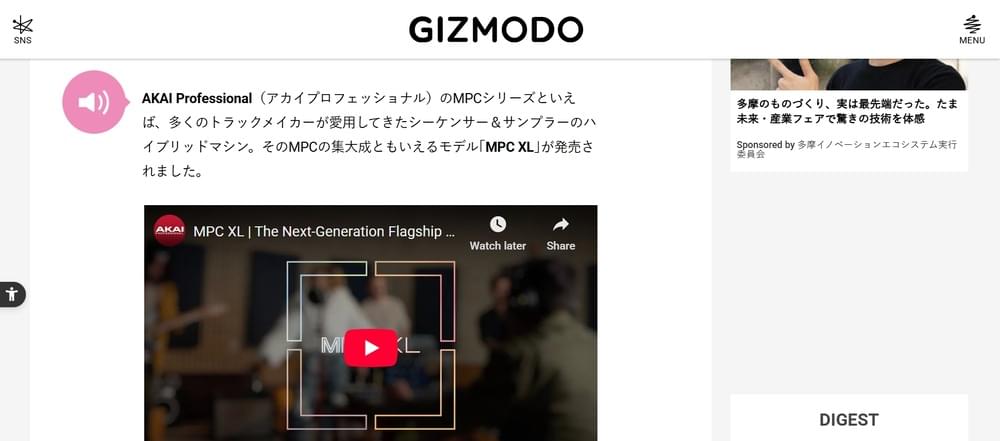
After providing the authorization, open your Japanese website and make sure the play button appears on your Japanese content. You can also check the real-time analytics in your dashboard to verify that the widget is tracking plays correctly.
Conclusion
Overall, this entire process of adding Japanese text to speech to your website can be completed within a few minutes. The best part is that the two available Japanese TTS voices, Haruto and Yuna, can cover a range of content types from formal business articles to casual lifestyle blogs.
So, start with the 14-day free trial of WebsiteVoice today and test how your Japanese audience responds to audio content. Contact us if you have any questions or need help with setting up Japanese TTS.
FAQs About Japanese TTS
How Many Japanese Voices Does WebsiteVoice Offer?
WebsiteVoice offers 2 realistic Japanese AI voices. These Japanese TTS voices are: Haruto (male) and Yuna (female). You can preview each voice in your dashboard before selecting one that suits your website.
Can I Add Japanese Text to Speech to My WordPress Site?
Yes! WebsiteVoice works with all major website platforms, including WordPress, Shopify, Wix, Squarespace, and custom HTML sites. WordPress users can also use the dedicated plugin for easier integration.
Can I Customize How the Japanese Audio Player Looks?
Absolutely. You can customize the audio player’s color and overall style to match your website’s design and specific requirements. A variety of customization options are available in the WebsiteVoice dashboard before you install the code.
Can I Track How Many Visitors Listen to My Japanese Content?
Yes. WebsiteVoice offers built-in real-time analytics that show the duration of visitors listening to your content.
Can WebsiteVoice Handle All Japanese Writing Systems Correctly?
Yes. Both AI Japanese voices available in WebsiteVoice are trained on native Japanese content. They can handle kanji, hiragana, and katakana characters with high accuracy. These Japanese TTS voices pronounce the words with proper pitch accent and natural intonation, making the audio sound authentic and relatable to native speakers.